Music under a voice-over: how to prepare a backing track
Tempo, vocals, pitch and loudness. Four things we check before a voice-over goes on the music, plus the licensing question.
A client sends over a song they like and asks for a voice-over recorded on top of it. The recording turns out fine, yet the whole thing sounds like a radio tuned between two stations. The voice and the music are talking at the same time and neither one wins. Almost always the backing track is at fault, not the voice artist. Below are four things we check before the voice ever goes on the music.
1. Tempo: the voice-over entries line up with the beat
Good spot editing is not accidental. Picture cuts, the start of a sentence, the pause before the company name, all of it sits better when it lands in time with the backing track. To do that deliberately you need to know the tempo of the track, that is the number of beats per minute.
Two methods. First: count on your fingers for fifteen seconds and multiply by four. It works, but at 128 beats per minute it is easy to lose count. Second: drop the file into a tool that detects the tempo for you. We use the BPM finder in CountIn, because it runs in the browser and, beyond the tempo, it shows where the "one" is, meaning the first beat of the bar. When the tempo drifts (live recordings, older songs cut without a click track), tap tempo is in the same place: you tap the spacebar along with the music and get a result based on what you actually hear.

In practice: at 120 BPM one bar lasts two seconds. If the first sentence of the voice-over starts at the top of a bar, and the company name lands on the "one" of the next one, the spot sounds as if it had been designed that way. Because it was.
2. Vocals in the backing track: two voices at once is one too many
The most common problem with a song chosen by the client: it has lyrics. The singer says their piece, the voice artist says theirs, and the listener understands neither. Five years ago the answer was "we need an instrumental version", which usually did not exist.
Today the vocal track can be removed from a finished mix. Tools that separate a song into parts (vocals, drums, bass, guitar, keys) do it in a few minutes and, in most cases, cleanly enough for narration. We use StemPlayer: you upload the file, mute the vocals and export the rest as a WAV. Be aware that separation is never perfect. In quiet passages a faint trace of the voice remains, audible on headphones, inaudible under a voice-over. In a chorus with backing vocals that trace can be more obvious; in that case it is better to use a verse or the intro alone.
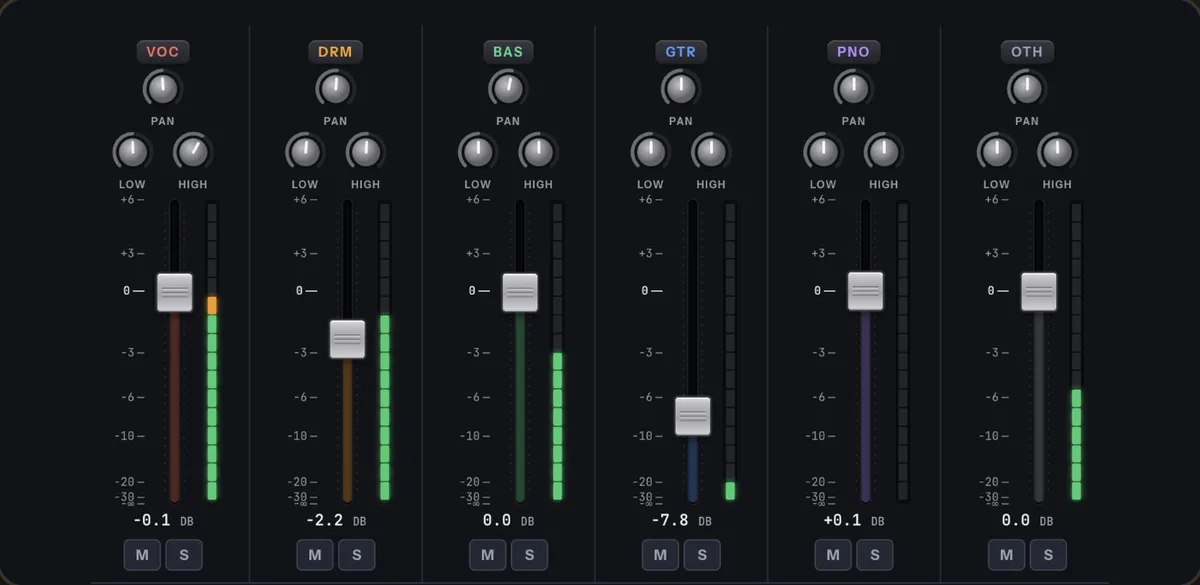
A second benefit of the same tool: if the backing track is too dense, you can turn down a single instrument instead of the whole thing. A guitar at half volume is often enough to give the voice room.
3. Pitch: the voice and the music should not sit in the same register
Something few people think about. A low male voice and a backing track with bass and cello in the same range blur into one smear. A high female voice, in turn, gets lost in a song led by a bright synth or violins. It is not about loudness, it is about pitch: two sounds in the same register mask each other.
The simplest way out is a different track. When the client insists on this one, the backing track can be shifted a few semitones up or down without changing the tempo; the key change in CountIn does this, the same app as the BPM finder above. A shift of two or three semitones is inaudible to anyone who does not know the song by heart, and it moves the music far enough from the voice for both planes to stay legible.
4. Loudness: the backing track goes under the voice, not next to it
We covered this separately in the piece on LUFS and why recordings differ in loudness, so here is the short version. A backing track under narration is usually mixed 15 to 20 dB below the voice, quieter than intuition suggests. If the music seems "too quiet" on headphones after mixing, that usually means it is right. The test: play the whole thing in a car or through a phone speaker. If every word is easy to make out, the backing track is where it should be.
Licensing: the client's song is rarely the client's song
A track bought on a record or from a streaming service can be listened to; it cannot be used in an ad, a phone announcement or a company film. That requires a synchronisation licence from the publisher and the label, and for well-known tracks its cost exceeds the budget of the entire spot. This is why we suggest music from libraries licensed for commercial use; there a backing track costs about an hour of work and does not come back a year later as a demand for payment. Every step above works the same way on library music.
What this means if you are ordering a recording
If you have a backing track in mind, send it together with the script before we start recording. We will check the tempo, remove the vocals, shift the pitch where needed and set the level under the voice. If you do not have a track, describe the mood and where it will be broadcast, and we will pick one from a library with the right licence. Either way the voice will be in the foreground, because that is what it is recorded for. Get in touch with the file and the script, and we will tell you what can be done with that backing track.